
An AI research tool can write your team a long profile of a competitor in minutes, built from whatever the tool can reach: the rival’s website, pricing page, docs, reviews, press and job posts, plus any files and apps your team connects to it. Most of the facts a competitive deal turns on are in none of those places until someone has been a buyer on the rival’s sales calls.
Even the price is often missing: when Dupple counted 377 business software tools in August 2026, a third kept at least one pricing tier behind a sales conversation, and 18% published no usable price at all. The demo a rep runs for a buyer like yours is published nowhere, and neither is what that rep says about your product. So the report leaves those lines blank, fills them from an old page, or states them with nothing behind them.
Mystery Demo books your competitors’ real sales demos as a credible buyer, records every call, and hands your team an analysis of what each rep quoted, showed and promised, on a shared Notion board. The steps below check a report line by line, and your team can run most of them from a desk. The questions only a buyer can get answered go to the rival’s sales calls, which is the step Mystery Demo takes for you.
The Facts That Decide a Deal Are Said Only to Buyers
An AI report can only work from evidence someone has collected. However many public pages it reads about your rival, it holds no record of the rival’s sales calls until someone has been the buyer on one. Connect your own call recordings and it can read what buyers told your reps about the rival, which is still secondhand.
Where a fact is only ever said to a buyer, the report leaves the gap or fills it with what it could read. Each row below holds a typical report line, where it can come from, and what only the rival’s sales call shows about the same thing. The report lines are invented.
| What the AI report says | Where it can come from | What only the rival’s sales call shows |
|---|---|---|
| “Plans start at $49 a user a month” | The pricing page, or a price list someone posted years ago | The price quoted to a buyer like yours, the discount and the terms |
| “Offers native CRM integration” | The features page and the docs | Whether it works on screen when a buyer asks to see it, on plans a free trial doesn’t include |
| “Built for enterprise security” | The trust page and the logo wall | What the rep says when a buyer asks for the security report |
| “Users say support is slow” | Review sites, written by people who chose to write one | How the rep answers it when a buyer raises it |
| Nothing about you | Nothing public | What the rep says about your product by name |
| “AI assistant launching next year” | Press, job posts and conference talks | What the rep promises a buyer, and by when |
The last row has a limit of its own: on a call you hear what a rep promises a buyer, never the roadmap itself.
A printed price is only where a negotiation starts, which is why finding a competitor’s real pricing takes a call. A report can find a price another buyer was quoted once, in a forum post or an old listing. A report has no record of what the rival’s rep will quote a buyer like yours this quarter, or what moves that number, until such a buyer asks.
The facts a deal turns on are said out loud, to buyers, so a report holds them only after someone has been the buyer and recorded them. Most of the rest can be checked from a desk, starting with what each line cites.
Step 1: Rewrite Each Line to What Its Source Says
Work through the report one claim at a time:
A citation is not proof. In a 2025 audit called DeepTRACE, four of five AI deep-research modes left more than half their relevant statements without support in the sources they listed. The audit used 303 debate and expert questions, with a language model checking each statement.
Here is what the check does to the report lines from the first table. Every line, page and date in it is invented.
| The report says | What its source shows | The line after the check |
|---|---|---|
| “Plans start at $49 a user a month,” citing a 2024 price list | The pricing page today lists $59 for the Team plan and “contact sales” for Enterprise | “Pricing page, read Oct 12: Team plan $59 a user a month; no Enterprise price published.” |
| “Offers native CRM integration,” citing the features page | The page lists a CRM integration and shows none of it working | “Features page, read Oct 12: lists a CRM integration.” Whether it works stays open |
| “Built for enterprise security,” citing nothing | No source; the rival’s trust page lists a SOC 2 Type II report | “Trust page, read Oct 12: lists a SOC 2 Type II report.” The rest of “enterprise security” stays out |
| “Users say support is slow,” citing a review site | 3 of the 41 reviews posted there since June mention slow replies | “3 of 41 reviews on one site since June mention slow support (read Oct 12).” |
| “AI assistant launching next year,” citing a news story | The story quotes the CEO announcing it, with no date | “Their CEO announced an AI assistant (news story, read Oct 12). No launch date given.” |
Prices go stale, so check the date on every price. When Parse, a firm that measures how brands appear in AI answers, checked AI price quotes by hand in 2026, 8 of 79 real quotes were wrong, and half of the wrong ones gave an older price.
Each line now says only what its page says, with the page and the date. A page that names a feature is not proof the feature works. A line no page supports stays open.
Step 2: Send Every Open Claim to the Source That Can Settle It
A claim with no support is not false yet. It is a question, and each kind of question has a source that can answer it, up to a point.
| Source | What it can settle | Where it stops |
|---|---|---|
| The rival’s own pages: pricing page, docs, release notes | What the rival publishes today: plan names, list prices, documented features, each with a date | The price quoted to a buyer, and whether a feature works on screen |
| A free trial or sandbox, where the rival offers one | Whether a documented feature works on your own data | Gated tiers, the quote, what the rep says about you |
| Filings and announcements | Funding, headcount, acquisitions and launch dates | What the product does, and what it would cost you |
| A customer: one of yours who switched from the rival, or a reference | What buying and using the rival was like when they bought | What the rival quotes and shows a buyer like yours now |
| The rival’s sales call, taken as a buyer | The quote for a buyer like yours, the product on screen, what the rep says about you | The roadmap itself: you hear what the rep promises |
Read each source only as far as it goes, to the same sourcing standard you would hold a battlecard line to. Anything only the rival’s sales call can settle stays marked unverified, and out of anything your reps say or send, until a call settles it.
Write each of those claims as the question a buyer would ask, with what would settle it:
Those questions need a buyer on the rival’s calls, which is the next step.
Step 3: Take the Call-Only Questions to the Rival’s Sales Calls
Your own team could request the rival’s demo, but its rep would see your company’s name on the booking. A team that shops its own rival gets recognized or gets the generic tour, while a believable buyer gets the real sales motion, discovery questions and discount conversation included. Mystery Demo is that buyer.
At kickoff, your questions become the project’s research objectives. Below is the Research Objectives page from our public example board, where the client and every competitor are invented. A real project’s board is built from its own client’s questions and calls.
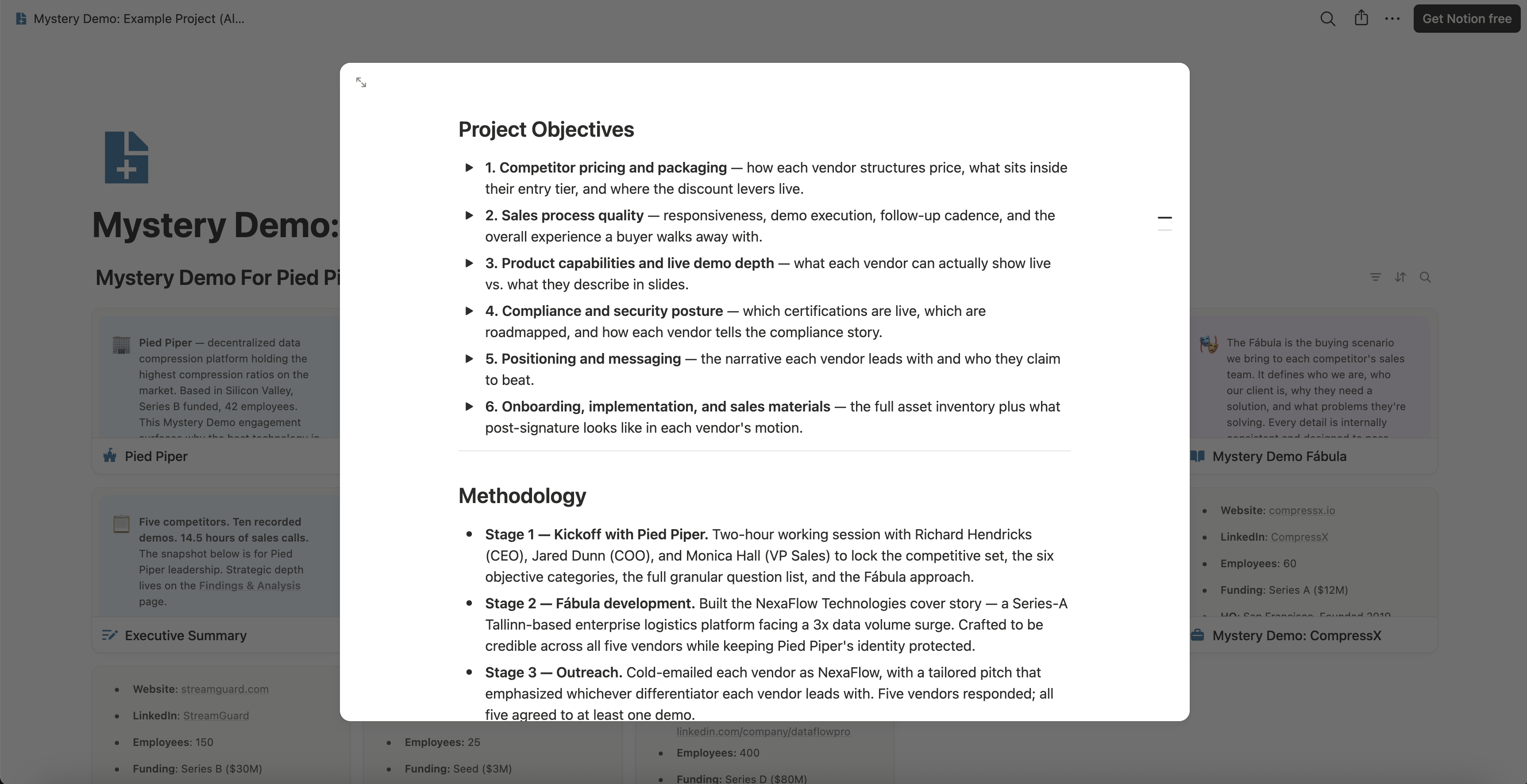
Objective three asks what each vendor can show live, set against what it only describes in slides. Its answer comes from a buyer in front of the product, in a rep’s demo or a trial, so a report has nothing to answer it with until someone has been that buyer. Putting a believable buyer in front of each rival’s rep takes four things:
The people who run these evaluations have sold B2B software themselves, so they know which question pulls a rep off the script. Every finding comes back with the recording, transcript line or email it rests on, so nobody on your team has to trust a summary.
The board settles a report’s feature lines on one page, the feature matrix, and every competitor product comparison is built around it. Each feature the rival’s rep shows on screen gets one of three statuses, the same way a competitive matrix built from rivals’ demos marks each feature:
| Status | What the screen showed | What it rests on |
|---|---|---|
| Shipped | The feature doing the whole job a buyer asked for | The date and minute it worked |
| Partial | The feature working, with a limit you could see | The date and minute the limit showed |
| Stub | The feature opened, but unable to do the job | The date and minute it failed |
A status rests only on what the screen showed. Anything the rep only said stays a claim, with its date and minute: a feature described, a date promised, a limit mentioned but never shown. A status is what one rep showed one buyer, so it carries more weight once later calls with the same rival show the same thing.
.png)

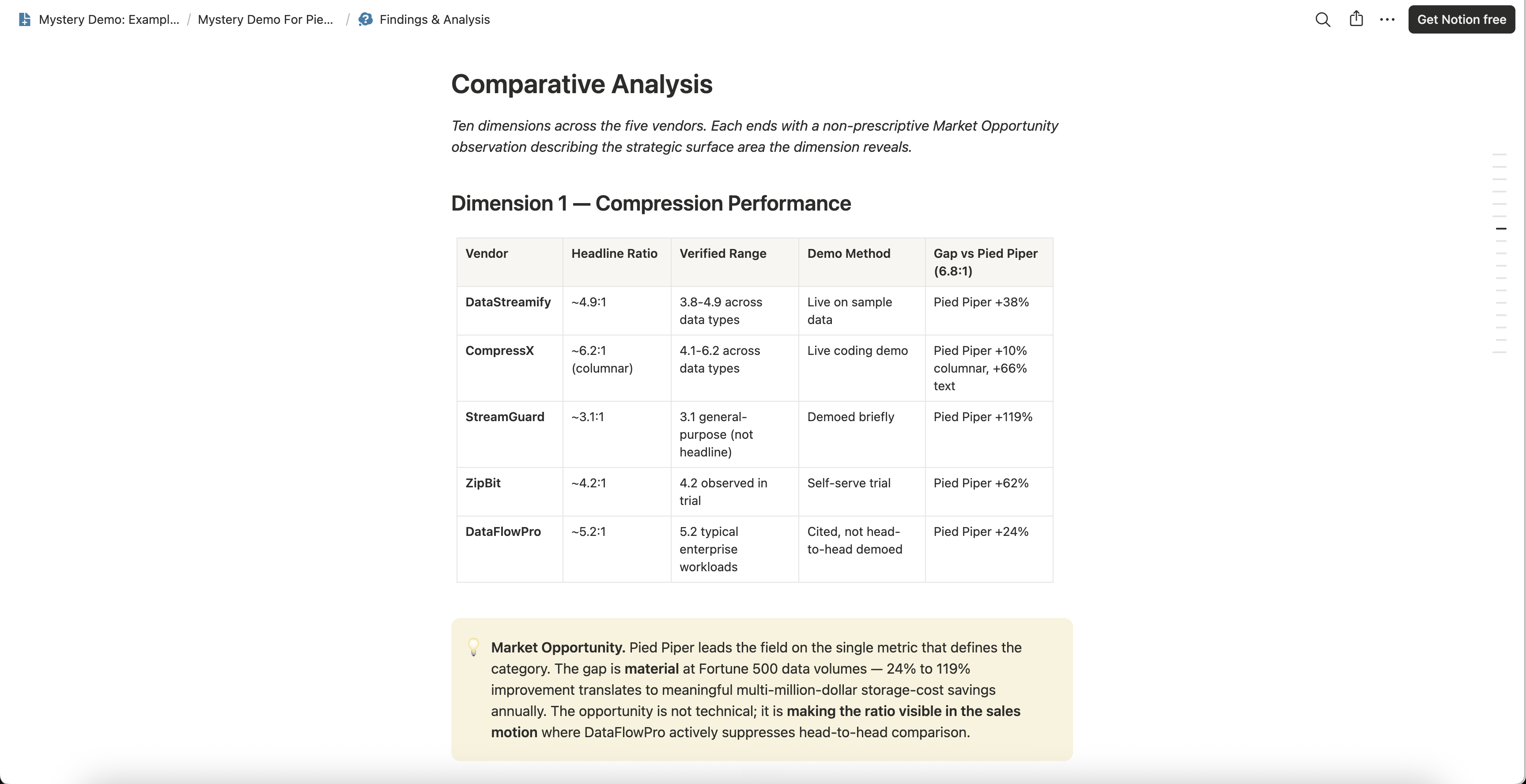
This is the comparison page on the same invented board. Each vendor’s headline claim sits beside what was verified, and the demo method column records how each claim fared in front of a buyer: shown live, tried in a trial, or only cited. A report has nothing to fill that column with until someone has been that buyer.
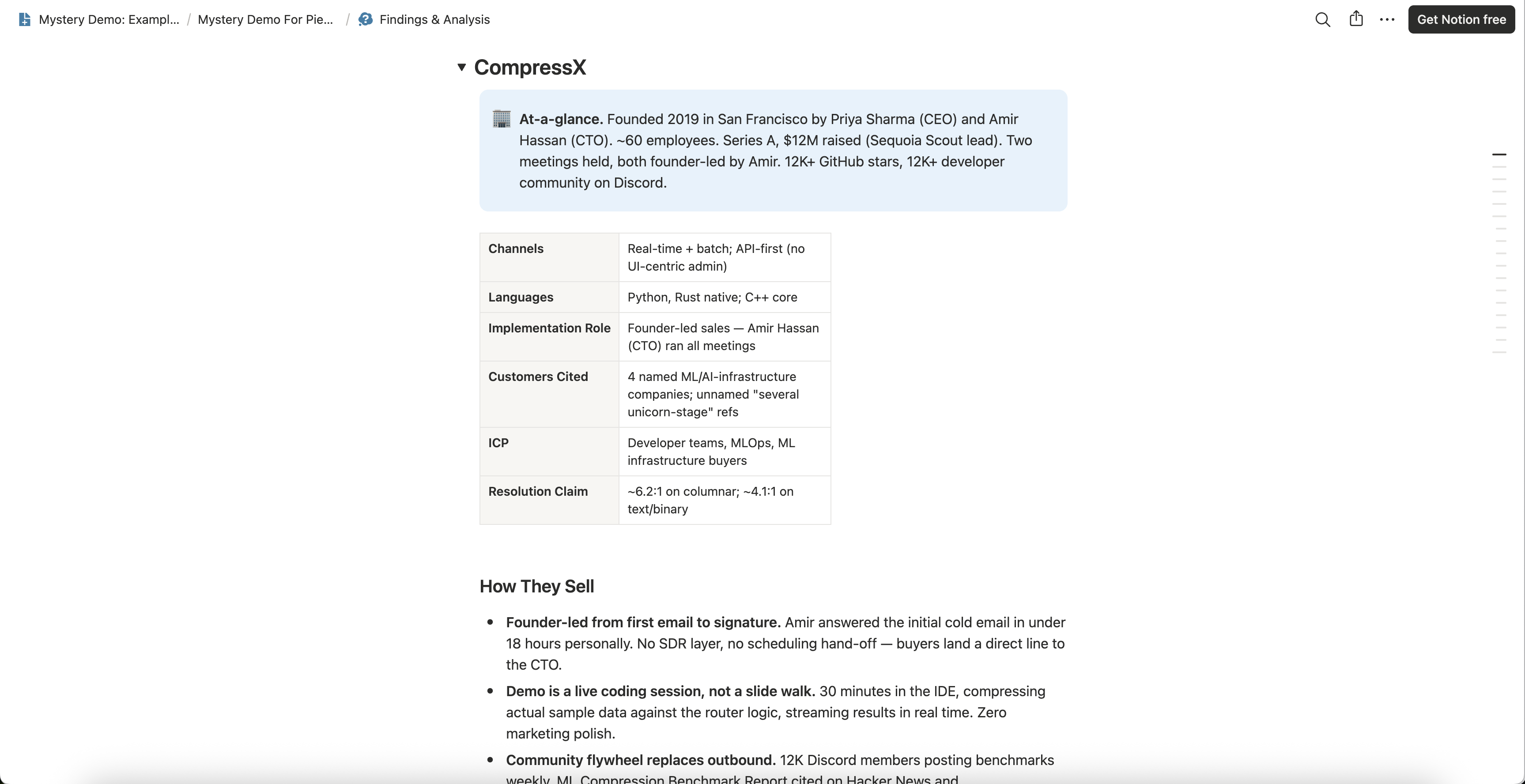
Further down the same page, each competitor gets its own section. On this one, the rival’s claims sit in a table near the top, and the part under them says how it sells, including what kind of demo it ran.
A project costs a flat €499 per competitor, everything included, and one competitor’s board is ready in one to two weeks. The questions left open in your AI report are a ready-made brief for that rival’s calls. Walk us through them on a short intro call, and we will plan which call settles each one.
Step 4: Put the Answers Back Into the Report
When the calls are done, the answers come back on the board as recordings, transcripts and emails. Your team carries each one back into its report, on the line it answers, and the transcripts are evidence your AI tool can read too.
Here is one line followed all the way through, for Rival A, a self-storage software vendor we made up. Every detail of it is invented, including the buyer on its calls: a self-storage operator with twelve sites.
In the feature matrix, lockout of late payers is partial: it worked on screen, but only when a manager pressed the button. Automatic lockout stays a claim, with its date and minute. The line a rep can use says nothing about whether any customer runs automatic lockout today, which is still open.
Do the same for every line. A line from a page keeps the page and the date you read it, and a call line keeps the call’s date, the minute and the buying scenario.
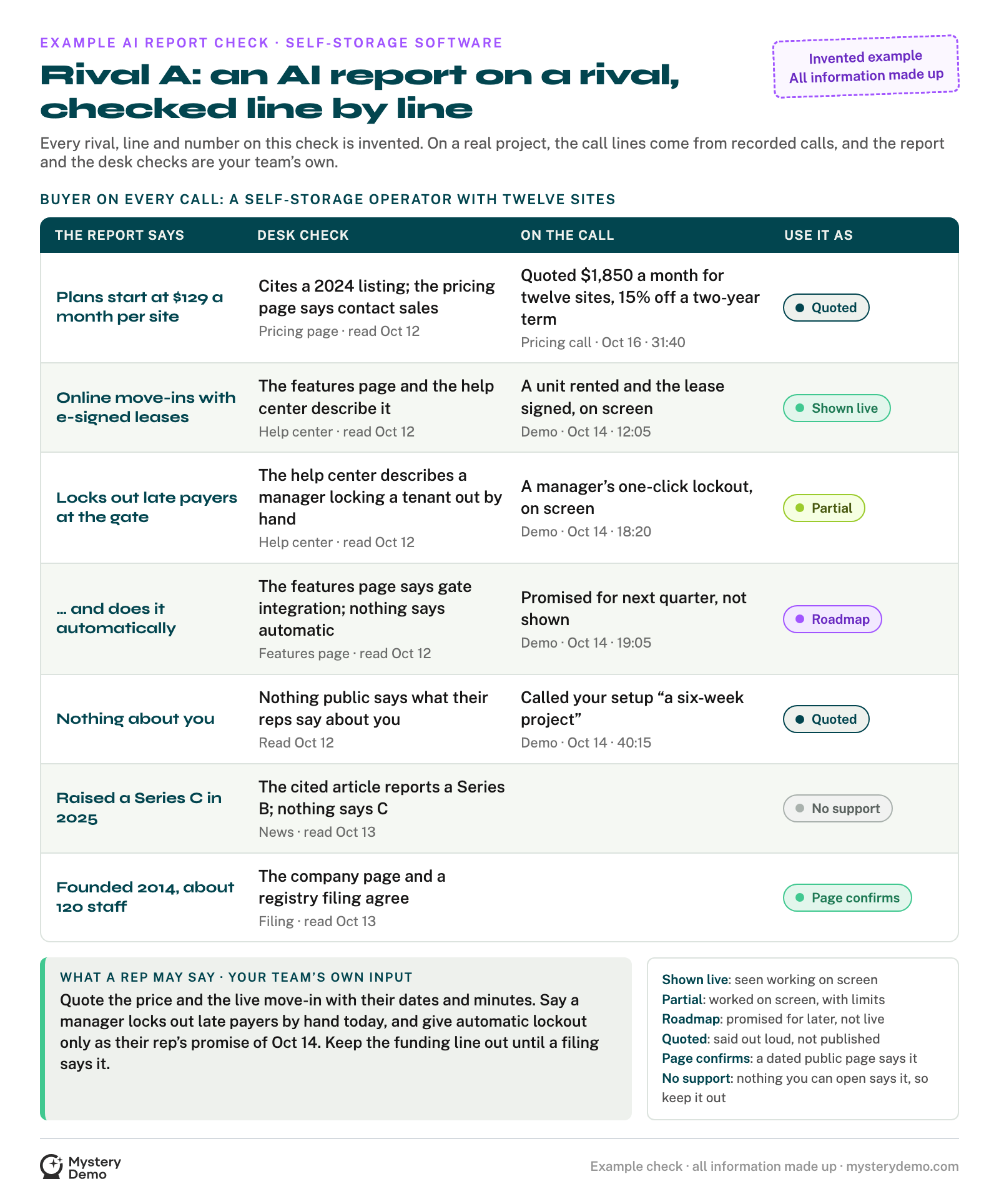
This is the whole report checked, for the same invented Rival A and buyer, with every line, date and minute made up. Its last column tells a rep how to use each line. Say a Shown live, Partial, Quoted or Page confirms line with its source and date, say a Roadmap line only as their rep’s promise with its date, and never say the No support line.
What Your Team Can Use Tomorrow
A checked report sorts every line into one of three uses:
The next AI report on that rival will leave the same questions open until someone has been the buyer on its calls and recorded the answers.
Keep the desk work in house. Hand us that report, and we will take its open questions into the rival’s sales calls as the buyer, then bring back each answer on the board, with the recording or email behind it.
.png)


