
“Rival A has native CRM sync.” A line like that sits in a competitive summary, and in a roadmap meeting it can move a quarter of work. Before it does, someone should ask three questions:
A summary line with no source behind it cannot answer them. The rep’s pitch, the screen in the demo and the vendor’s website went into one sentence on the way to the slide. Whatever replaces that line also has to be quick to read in the meeting where the roadmap gets decided.
Mystery Demo books competitors’ real sales demos as a credible buyer, asks to see the claims working, and records every call. It hands back a Notion board where each finding links to the recording, transcript line or email it came from, and on request the same findings as a PDF report. Below is one page of an invented example: one rival, two claims, and every line saying what kind of evidence it is.
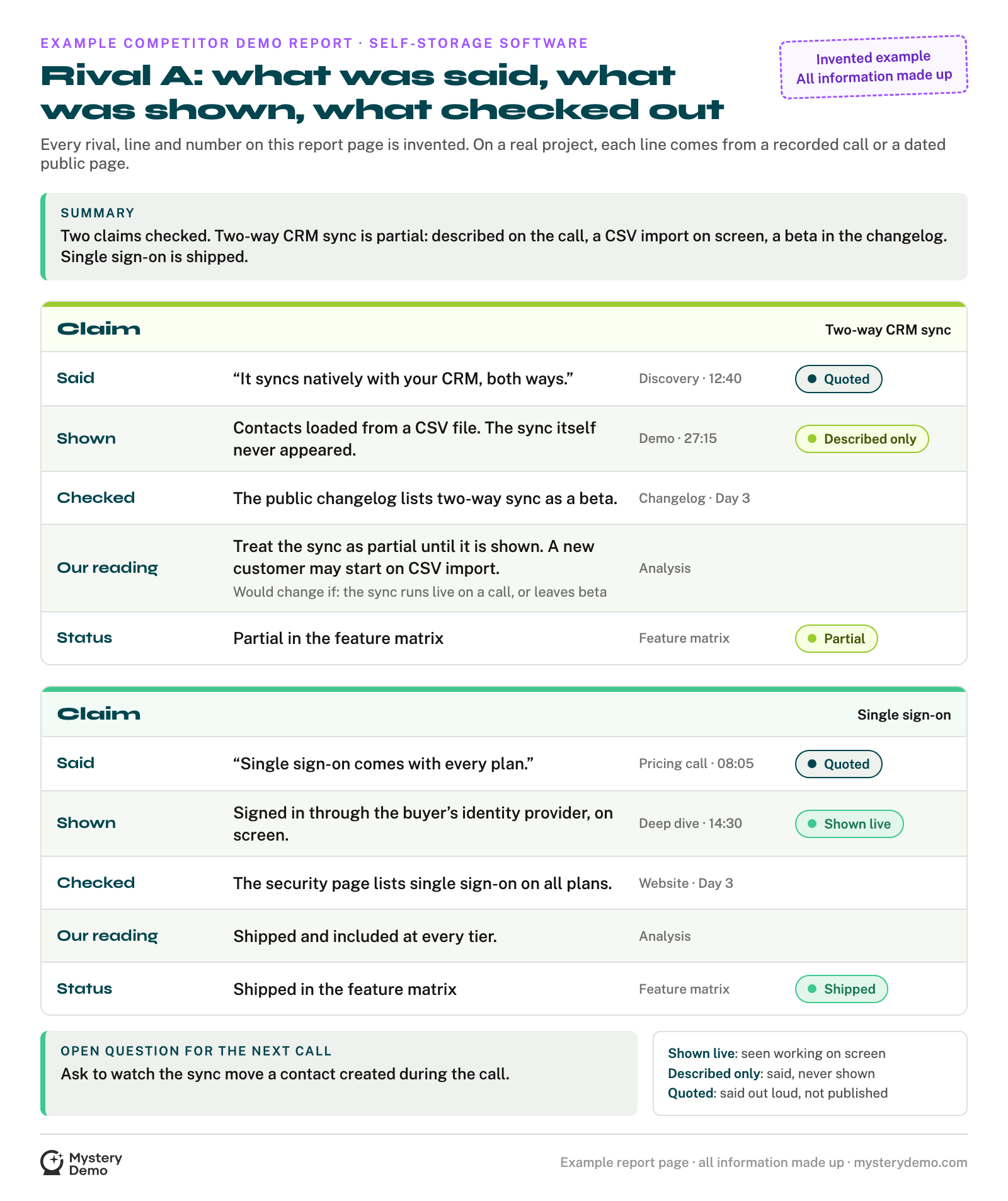
Everything on that page is made up, including the rival, the minutes and the category, and the image says so in its own corner. The discipline is real. On a real board, every claim traces back to the call it came from and is checked against the public record before anyone writes the analysis.
The rep said the CRM sync was native. The screen showed contacts arriving from a CSV file, and the vendor’s changelog calls two-way sync a beta. The page keeps all three on separate lines instead of averaging them into “yes, mostly.”
Three versions of one feature can look like somebody lied. That is not what it means.
Why One Feature Ends Up With Three Versions
Each version, as we read it, is made by a different person for a different job. The rep is selling the product the deal will get, so a feature due next quarter can get described in the present tense. The demo environment is set up to show the product at its best, and a sync that needs an admin and a week of setup may never make it into a forty-minute call.
None of the three has to be false for the summary to be wrong. Each one is true about something different, so a report has to hold all three and say which is which.
The public record helps, up to a point. A beta or preview label sounds like a verdict, and it does not carry one meaning even inside a single company: Microsoft’s documentation says preview features in Power Platform aren’t meant for production use, while public preview features in Intune can be used in production and are fully supported. The label tells you what to ask, not what the answer is.
A template does not close the gap on its own, either. The free competitive analysis template from PMRead, built for product managers, rates every competitor feature as full support, partial, not available or on our roadmap, one mark per cell, with no column for who said so or when.
| Where a line comes from | What it proves | What it cannot tell you |
|---|---|---|
| The rep’s words, with the minute | What the company told this buyer, that day | Whether the feature exists, or on which plan |
| The screen, with the minute | What worked in that demo setup, at that moment | Whether it is on general release, or holds up at your scale |
| The public record, with the day it was read | What the company is willing to print | Whether it works for a buyer like you |
| The analyst’s reading | A judgment that joins the other three | Nothing on its own, so it names what would change it |
Read down the last column and one question is left over: whether the sync works for a buyer like you. The closest anyone outside the company can get is a live call where a buyer asks to watch it run.
How a Mystery Demo Gets the Feature Onto the Screen
Reps run screen shares for prospects, so before Mystery Demo books a single call, it builds a prospect. The prospect is a believable company with a real reason to evaluate software, fitted to each competitor’s ideal customer. We call that backstory the fábula, and the only invented part is which company the evaluation is for.
Then we request the demo through the competitor’s normal front door, the way any serious buyer would. From there, a feature claim gets three chances to show what it is:
Asking the right question in that deep dive takes practice. A request to watch the sync move a contact created a minute ago is the kind that separates the two. The operators who run our demos have sold this kind of software, so they know which question pulls a rep off the script.
None of those three moments happens in public. A website shows what a company prints, while the screen and the follow-up go to a buyer.
This is the Research Objectives page of our public example board, where the client and every competitor are invented, so look at the structure rather than the names. Its lower half lays out the five stages every project runs, from the kickoff and the buying scenario to the recorded demos and the cross-check of every claim against public sources.
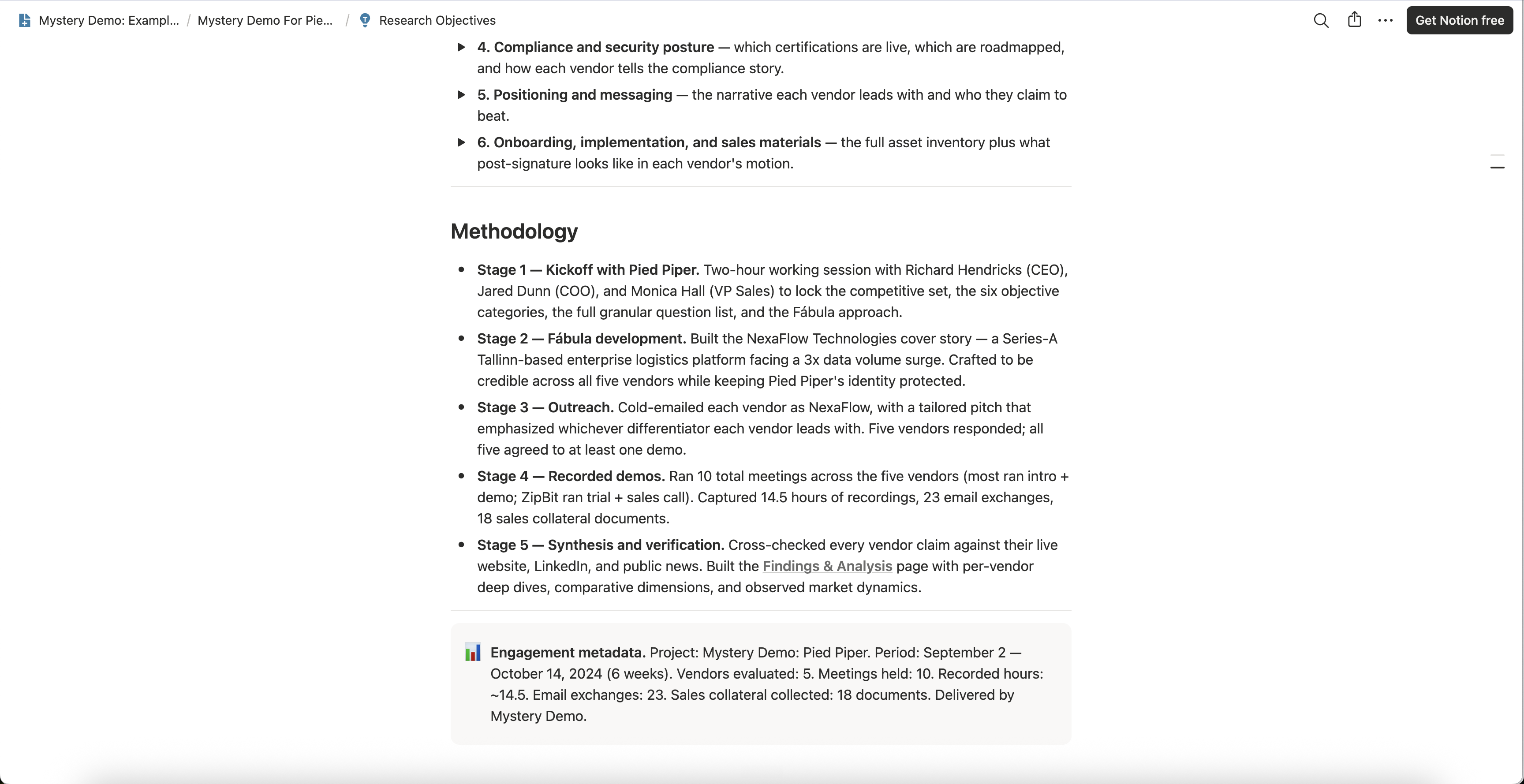
The fifth stage turns the calls into findings. Transcripts are cleaned, every claim a rep made is checked against the live website and public news, and only then is the analysis written. On the example page, that analysis splits each claim into lines that answer different questions.
Reading the Example Report, Line by Line
Start with what the rep said. On the invented page, it came up in discovery, at minute 12:40:

The quote carries its minute so anyone can play it back, and it proves exactly one thing: what this company told this buyer, that day. It does not prove that the feature exists.
The shown line comes next, also with a minute. On the example, contacts arrived from a CSV file and the sync itself never appeared, so the claim is marked as described but not shown. A screen proves what worked in that demo setup at that moment, which is more than words prove and less than knowing it is on general release.
The checked line is the public record, with the day it was read: here, a changelog that lists two-way sync as a beta. It goes next to the quote rather than over it, because a label settles little on its own, as Microsoft’s two preview programs show.
Then comes the line a bare summary has no room for: our reading, labeled as one. On the example, it says to treat the sync as partial until it is shown, because a new customer may be starting on CSV import.
The reading also names what would change it: the sync running live on a contact made during a call, or a release note that takes it out of beta. With that line in place, the reading can be tested on the very next call.
Last comes the status that goes into the feature matrix, where every competitor’s claims are compared side by side as shipped, partial or stub. A claim is partial when only part of it was shown, and shipped when it was shown working and the vendor prints it. The CRM sync lands on partial, and the single sign-on, shown working and listed on the vendor’s security page, lands on shipped.
The four lines above the status hold four kinds of evidence, from a screen you can replay to a reading you can only test, and an evidence grade is the name for ranking them. On a page like this, the status comes last, after the evidence that earned it.
On a real board, a competitor’s claims live on its own page. Here is the analysis layer of one such page on the invented example board. Its sourcing line says how many meetings and minutes stand behind the insights, and which public sources they were checked against, before a single insight is offered.
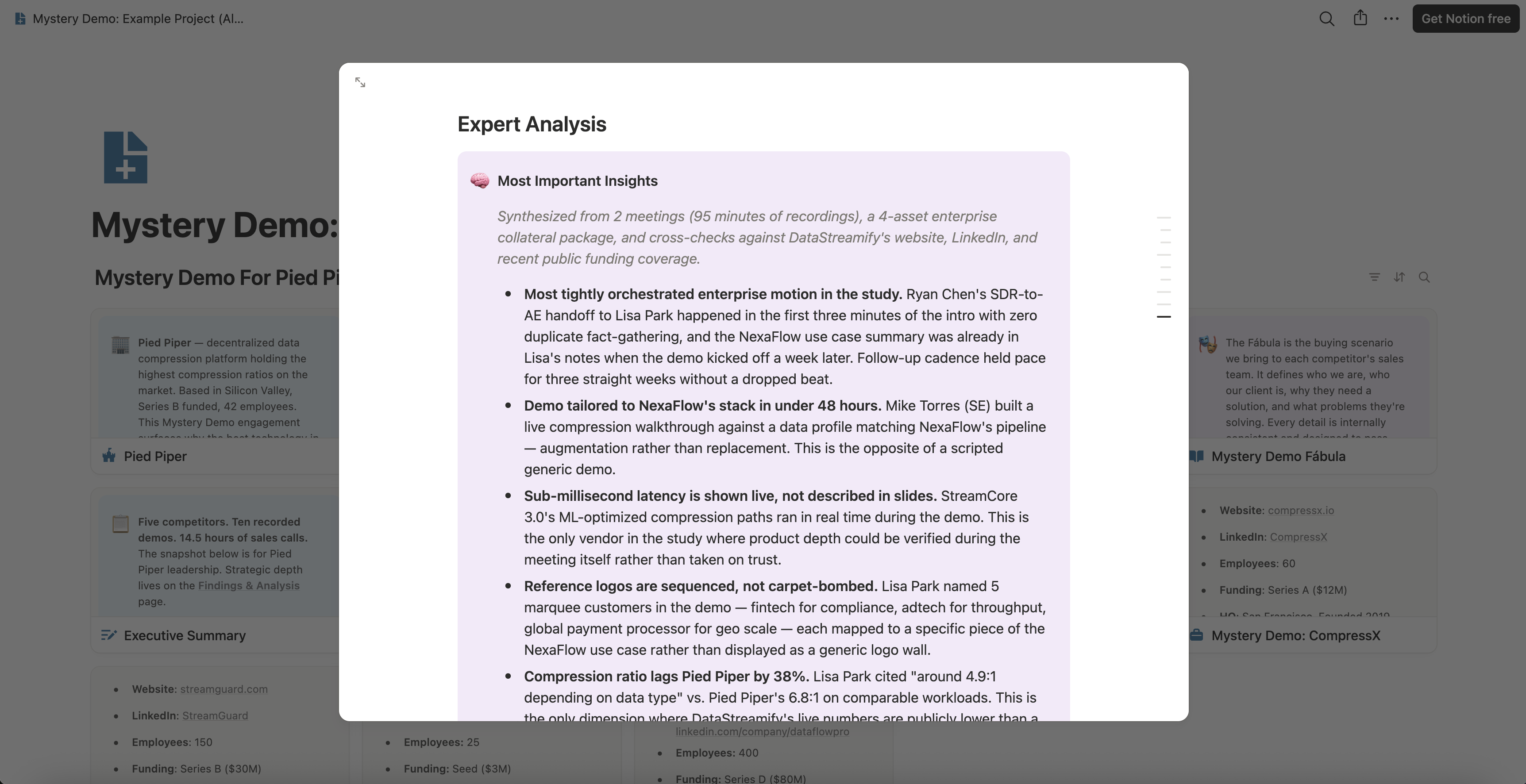
A product lead may want every one of those lines. A CEO may want the status and nothing else, and a good report lets both of them stop in the right place.
The Board Lets Each Reader Stop at Their Layer
Every Mystery Demo project lands on one Notion board, and its pages work as layers, from the verdict at the top to the raw call at the bottom. Each reader goes down as far as their decision needs, and no further:
That layering is what makes the board fast to use. Nobody has to trust a summary, and nobody needs a walkthrough to find where a claim came from, because each finding links back to its recording, transcript line or email.
Here is the whole board of the invented example project at a glance. Every page is a card, from the client’s profile and the research pages to the Executive Summary, Findings & Analysis, the Database and one page per competitor.
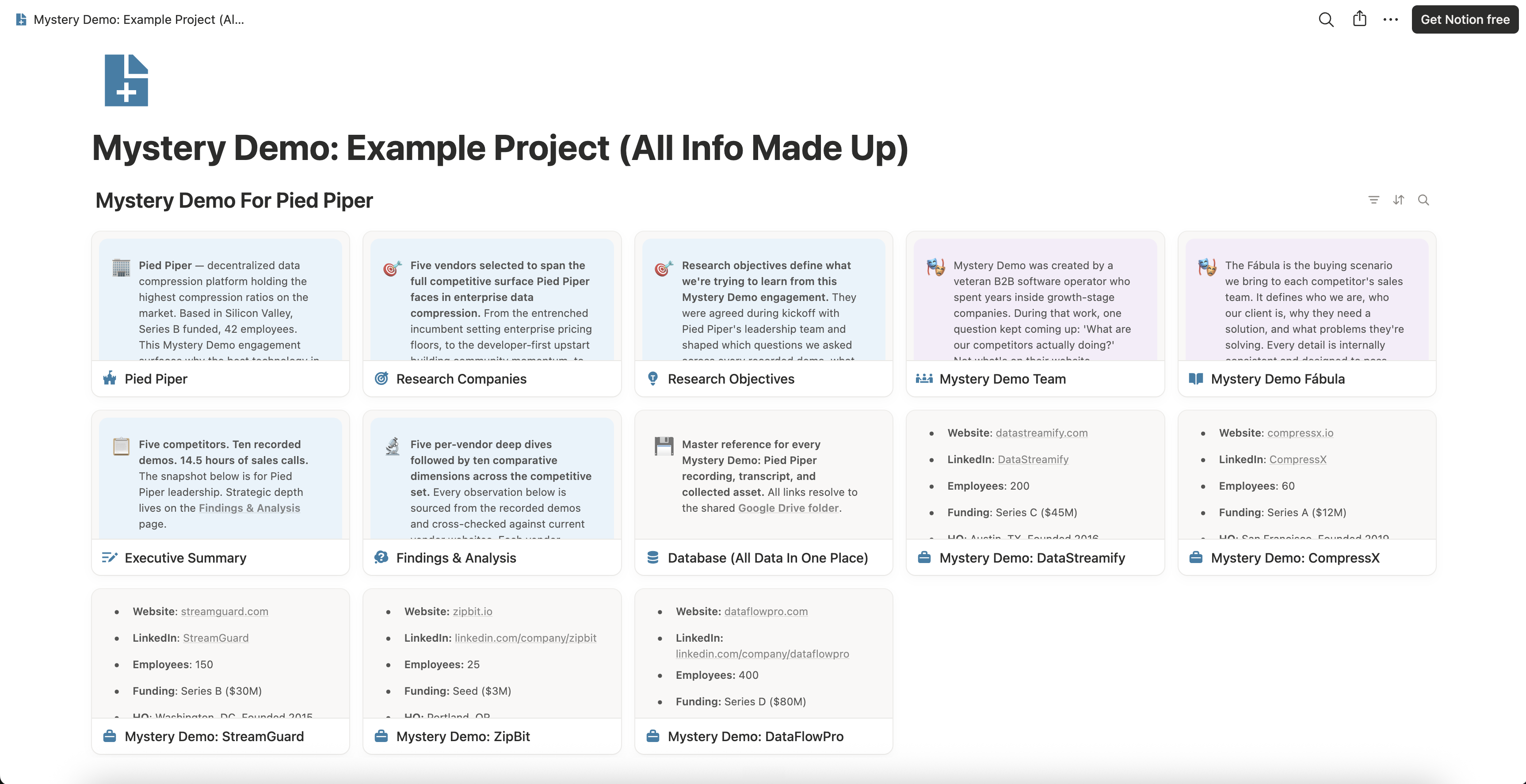
A board is built for working in. The meeting where the roadmap gets decided often runs on one document instead.
The Same Findings as a PDF Report You Can Forward
Some readers never open Notion: the executive who prints everything, the colleague in another team, the leadership meeting where one document goes round the table. For them, the same findings can also go out, on request, as a branded PDF report of about twenty pages, generated from the board as an add-on.
Each competitor gets its own section, written as observations from the calls and never as advice. The board stays the place where every finding keeps its recording, so the PDF is the version people read top to bottom and the board is the one they check.
Below is one page of an invented PDF report, Rival A’s section, so you can see the shape. It carries the same CRM sync and single sign-on findings as the page at the top, in prose meant to be read straight through.
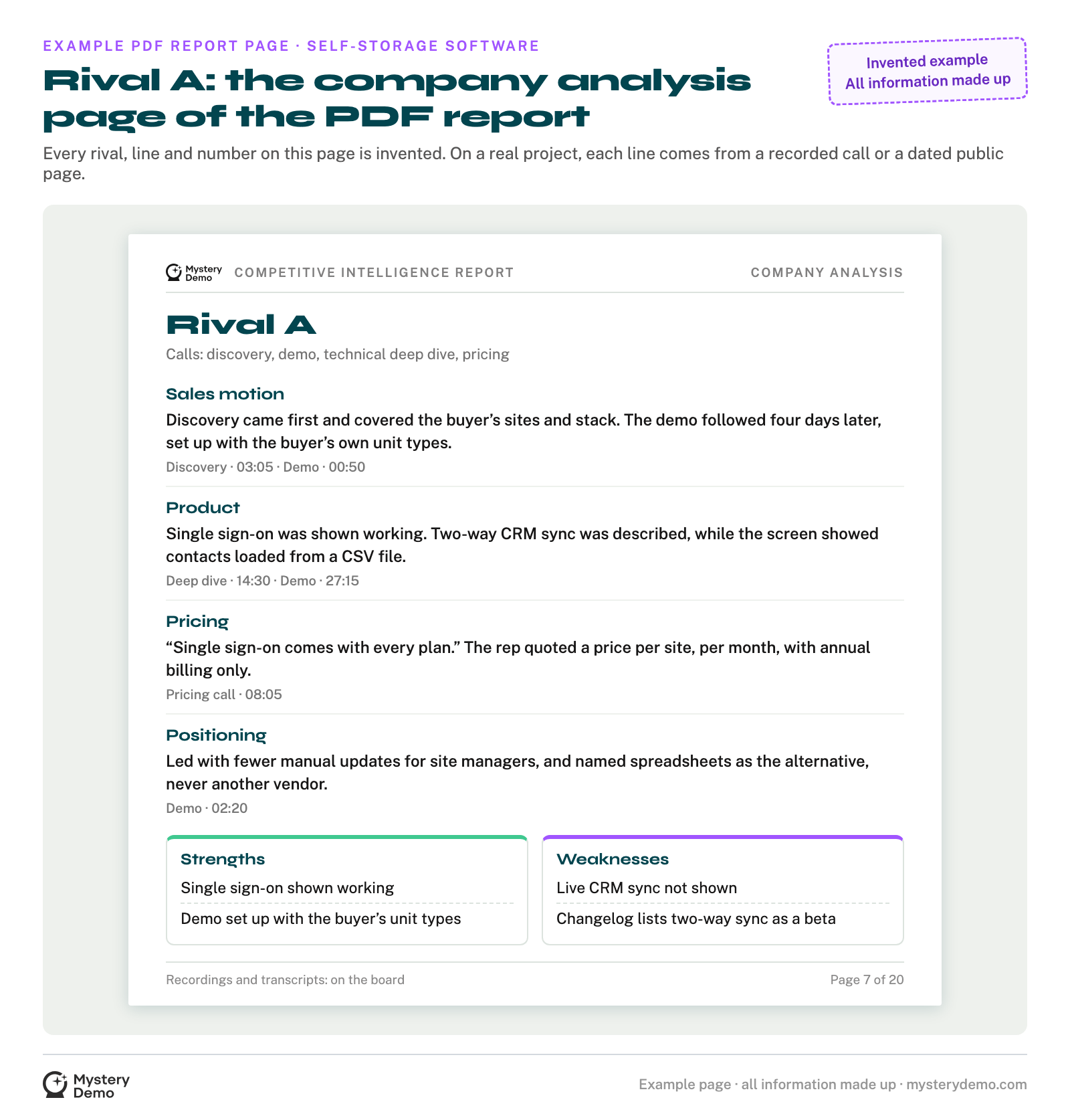
Both formats come from the same calls, and the calls are the hard part. A believable buyer has to be fitted to each competitor, or the rep may run the generic tour. Every finding has to keep its recording, or the report fails the first skeptic in the room.
Mystery Demo runs those calls and builds the board for a flat €499 per competitor, and one competitor takes one to two weeks. It is our competitor product comparison work: what each rival ships, feature by feature, shipped, partial or stub. If a rival’s feature claim is about to move your roadmap, bring it to an intro call before it does, and we will talk through which calls could settle it.
Whoever takes your rivals’ demos, us or your own team, the same four things decide whether the result can be trusted.
What to Ask for in Any Competitor Demo Report
A competitor demo report earns its place in a roadmap meeting when every line can answer the three questions from the top: who said it, did anyone see it work, and does anything in writing agree. Ask for these, from us or from anyone:
If the report you were handed cannot show those four, the claim that worries you is still open. The way to narrow it is a call where a buyer asks to see the feature running.
The first board we hand you will keep the same discipline as the example at the top, with your rivals on it and every quote and screen tied to its recording. If the roadmap meeting needs a PDF report, it comes from the same board. Tell us on an intro call which claim you need settled first, and it goes at the top of the question list.
.png)


