
Buyers ask your reps about a competitor’s new AI feature before anyone on your team has seen it work. The rival’s launch post is all anyone has read, and reps need something to say on their next call.
Buyers bring AI questions to vendors as a matter of course. In a 2025 survey of 766 B2B buyers in North America and the UK by 6sense, which sells sales and marketing software, 62% asked vendors about the AI in the products they were weighing. 58% got in touch with sellers sooner than they otherwise would have, to get those answers.
Below is a brief an enablement team can finish this week: every AI capability the rival announced, what anyone has seen each one do, and what reps should say. Mystery Demo books competitors’ real sales demos as a buyer and asks to see each announced feature work. Its recordings fill the one column a launch post never can: what the feature did when a buyer asked to see it.
Step 1: List Every AI Feature the Rival Announced
Start from what the rival published: the launch post, the release notes, the help docs and any demo video. Write down each AI capability in the rival’s own words, with where it said so and the date. Interpret nothing yet.
Split a feature into separate rows wherever its parts could turn out differently. A feature that drafts reports “in any language” makes two claims, and the drafting can work while the languages do not.
In the invented example that runs through every step below, Rival A sells field service software. Its launch post says the new AI assistant “writes the job report from your technician’s photos, in your customer’s language, and quotes the repair on the spot,” with automatic scheduling “coming soon.” That is four rows:
The list holds Rival A’s claims and nothing else. Next, mark what anyone has seen each one do.
Step 2: Mark What Anyone Has Seen Working
Look for proof that each capability runs, beyond the post’s own words. A help article with screenshots shows a screen, not the feature producing it. A launch video shows more, and it needs a careful read.
A launch video follows a path the rival chose, on data the rival prepared. Write down what it ran on, and keep it apart from what a buyer has seen, because a product tour and a live sales demo answer different questions.
Then fill in the brief’s columns for each row. A row can go in more than one, such as a feature that runs in part and is promised for the rest:
For Rival A, done honestly, this step leaves the shown-working column empty. Its video drafts a report from the rival’s own sample job, and the other three rows have the post’s words and nothing more.
A launch post is the rival’s case for its feature. A sales call is where a buyer can ask to see the feature run on a job like theirs, and watch what the rep does. Reps cannot wait for that call before the next buyer asks, so the brief goes out first.
Step 3: Give Reps an Answer for Each Feature
Each answer follows its row’s evidence, and each comes with a question the buyer can put to the rival. A rep should never guess at what a rival’s feature does. One enablement practitioner put the cost of a guess plainly on LinkedIn: “Get one claim wrong on a call and the rep stops trusting the card, and you.”
| What the brief says | What the rep says | What the buyer can ask the rival |
|---|---|---|
| Not yet seen in a live demo | The team is checking what it does live | To see it run on their own data |
| Shown working | What it ran on, and any limits | To see it run on their data, past those limits |
| Only described | It has not been shown | To see it working |
| Promised for later | It is not out yet, and when the rival says it will be | For the date in writing |
Every one of those questions is fair to put to any vendor, yours included, so reps can offer them without sounding defensive. Whatever buyers learn by asking goes into the next version of the brief.
Here is Rival A’s brief as it goes out this week. The rival and every line in it are invented.
| Rival A announced | Shown working in a live demo | Only described, or promised for later | The rep’s answer this week |
|---|---|---|---|
| Drafts the job report from the technician’s photos (launch post) | Not yet seen. The launch video runs it on the rival’s own sample job. | Described in the post | “We’ve seen their video, not a live run. Ask them to draft a report from one of your jobs.” |
| Writes the report in the customer’s language (launch post) | Not yet seen | Described in the post | “We haven’t seen it work yet. Ask to see a report in the language your customers use.” |
| Quotes the repair on the spot (launch post) | Not yet seen | Described in the post | “We’re checking how it prices a job. Ask them to quote one of your recent repairs.” |
| Schedules technicians automatically (launch post) | Not yet seen | Promised: “coming soon,” no date given | “It isn’t out yet, and they haven’t said when. Ask them for the release date in writing.” |
Send it within days, with every “not yet seen” left in place. One product marketer’s rules for battlecards, shared on Reddit, include this one: “clearly flag anything based on AI or third-party claims that you haven’t verified.”
A brief that marks its gaps keeps reps from guessing, and it names the cells to fill next. No row has been seen working in a live demo yet, and only a buyer in the rival’s demo can change that.
Step 4: Watch the Rival Demo It to a Buyer
A launch post and a launch video show the feature the way the rival chose to show it. A sales demo is different, because a buyer can ask to see the feature run on their own kind of job, and whatever the rep does next is the answer.
Nothing said in that room is published. One product marketer on Reddit, explaining why most of their competitor monitoring had been pointless, put it bluntly: “Reps get beaten by whatever the competitor says about us in the room and none of that was ever a public information.”
Mystery Demo is the buyer in that demo. We book it through the rival’s normal front door, as a credible buyer with a buying scenario built to fit what that rival sells, and record every call. For an AI launch, the questions we carry in sound like this:
Everything from those calls lands on a shared Notion board, the client’s workspace for the project, with a page for each rival that holds its recordings, transcripts and our analysis. Below is the analysis on one rival’s page from our public example board, where the client and every competitor are invented. A real project’s board is built from the calls we run on that client’s own competitors.
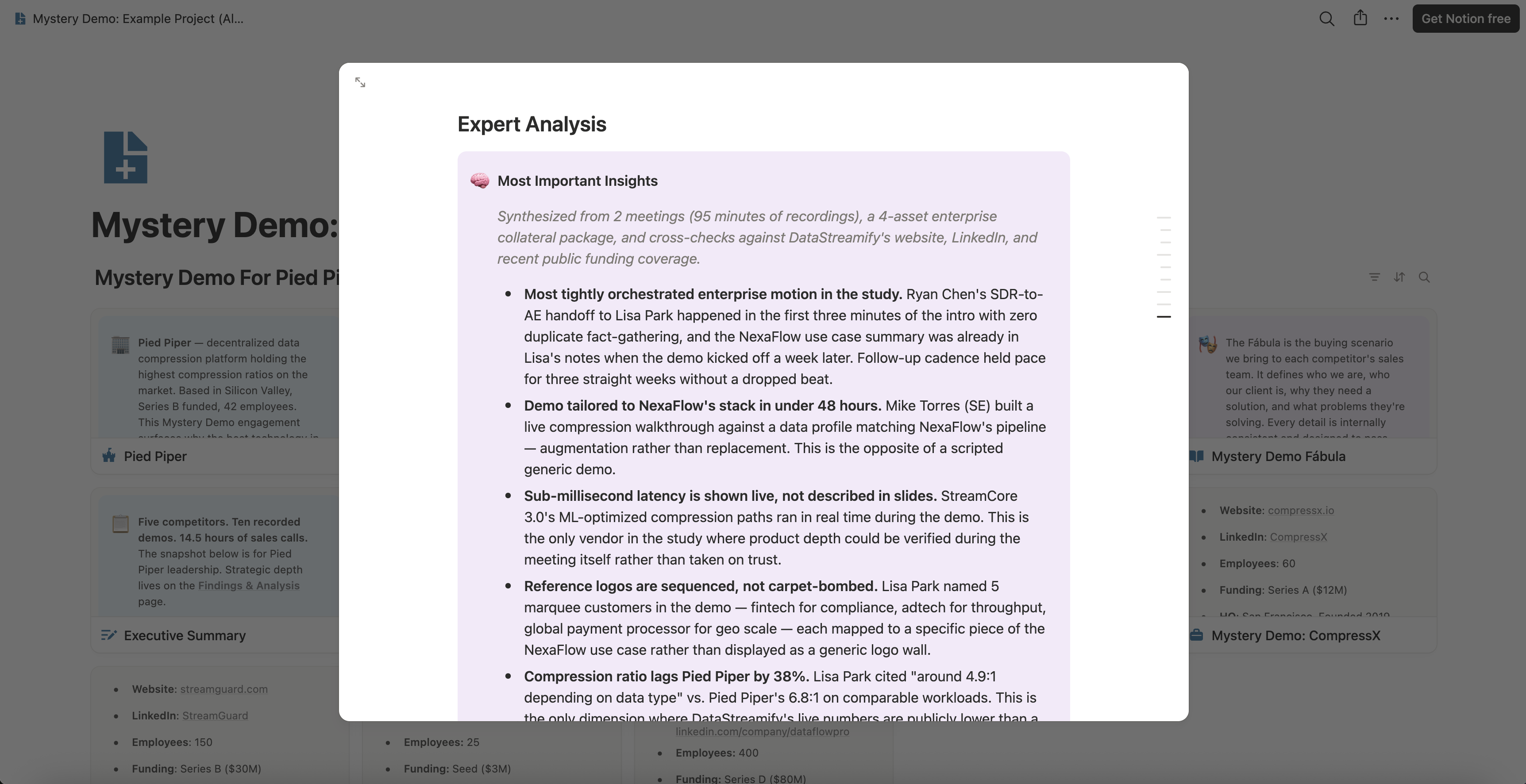
The line under the heading names what the analysis was built from: the meetings, the minutes of recording and the checks against the rival’s public pages. One insight below it makes the same split as your brief, between a capability shown live and one described in slides.

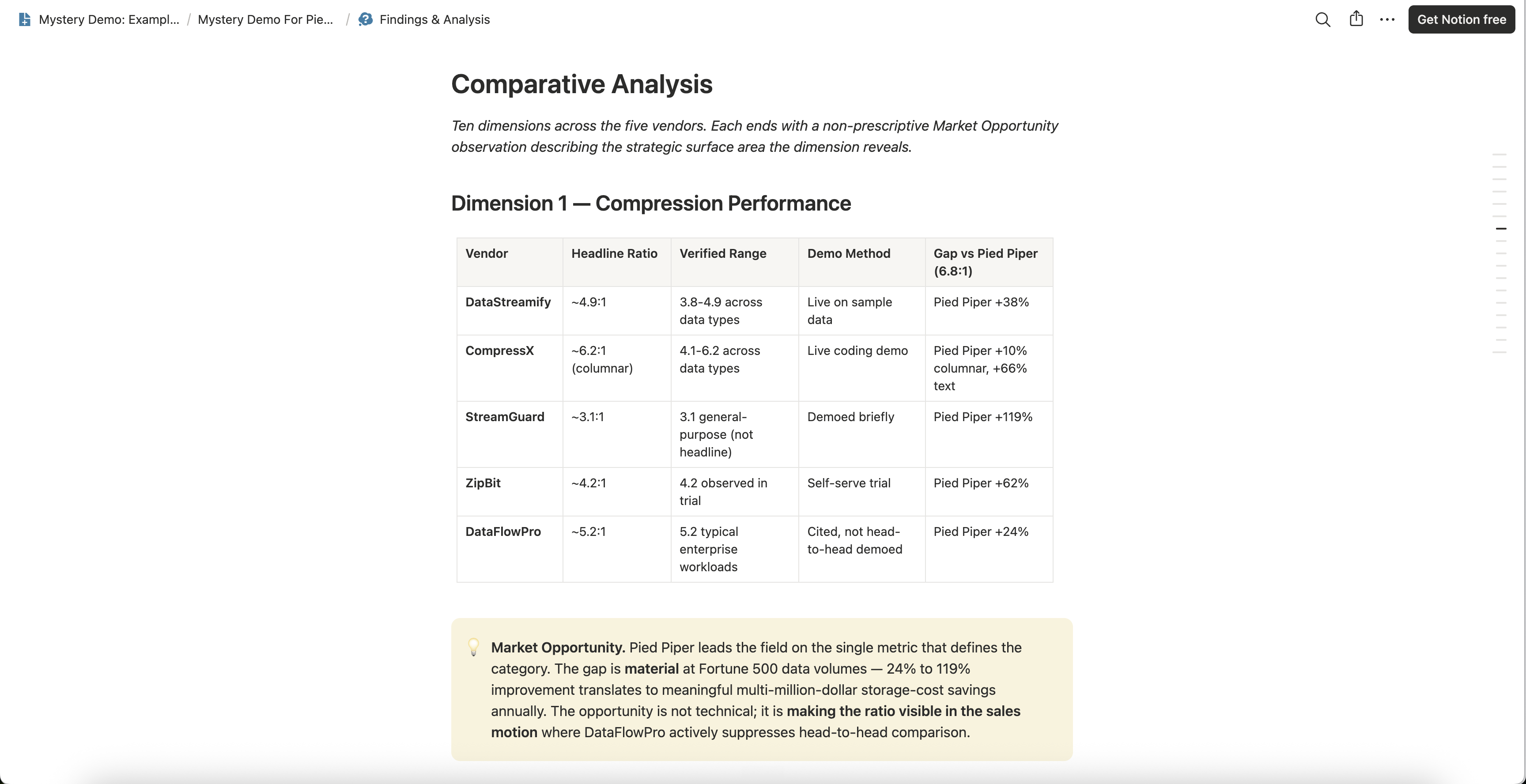
Across rivals, those observations are compared on the board’s Findings & Analysis page, one topic at a time. In the example below, each vendor’s headline claim stands beside what its demo showed, and a column says how the claim was shown. That is the evidence your shown-working column is waiting for, kept for every rival.
The same recordings feed battlecards where every line links to the recorded moment, so when a rep says a rival’s feature was only described, the moment it was described is one click away. For Rival A, the recording would come back as a claims map like this one, invented like everything else about Rival A: each announced capability, marked with what the demo showed.
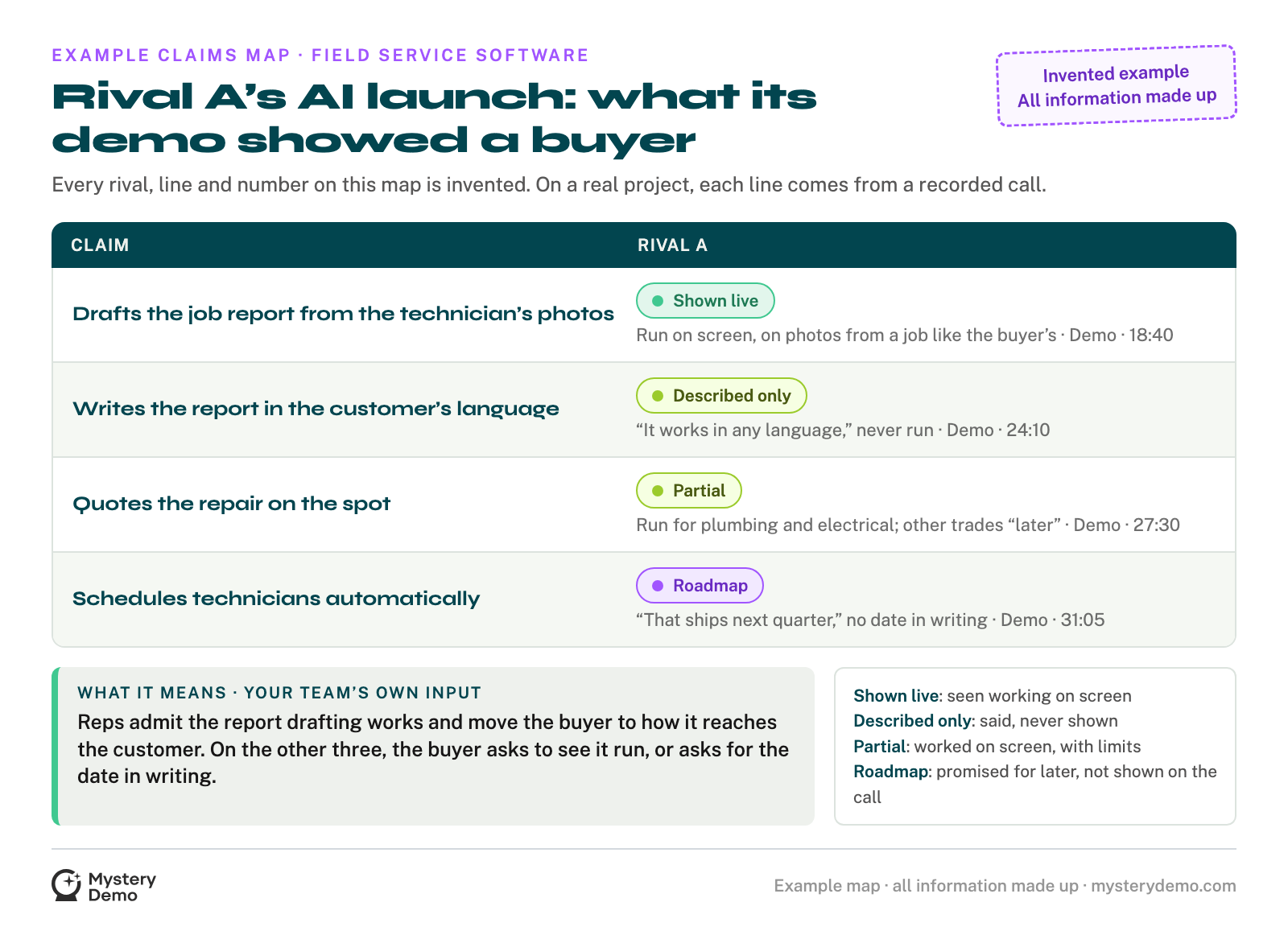
“Partial” means the feature ran within limits the rep named, so the brief records it as shown working, with those limits. The job report ran on photos from a job like the buyer’s, which makes it the strongest kind of shown.
Your own team could request the demo, but the rival’s rep would see your company’s name on the invite and give you the safe tour. Mystery Demo’s buyer is believable because the scenario is built for each rival.
Because the people asking have sold software, they know which request moves a rep off the prepared path. Each finding comes back as a recording, with the minute of the call it came from. One competitor costs a flat €499, and its board is ready in one to two weeks.
That timing is why the brief went out first. If a rival’s AI launch is already coming up on your calls, tell us which rival on a short intro call. We will ask to see each announced feature working, as a buyer, and bring back the minute it ran or the minute it became a promise.
Step 5: Update the Brief When the Recording Comes Back
Replace each “not yet seen” with what the recording showed, under what conditions and at what minute. Then rewrite the rep’s answer to match. The question for the buyer changes too, because it can now point at the exact gap the call found.
| Rival A announced | The rep’s answer this week | The rep’s answer after the recording |
|---|---|---|
| Drafts the job report from the technician’s photos | “We’ve seen their video, not a live run. Ask them to draft a report from one of your jobs.” | “Yes, on their demo it drafted a solid report from photos of a job like yours. Ask them how that report gets to your customer, and compare it with ours.” |
| Writes the report in the customer’s language | “We haven’t seen it work yet. Ask to see a report in the language your customers use.” | “Their rep said it works in any language but didn’t show it. Ask them to show a report in your customers’ language.” |
| Quotes the repair on the spot | “We’re checking how it prices a job. Ask them to quote one of your recent repairs.” | “It quoted plumbing and electrical jobs on the call, and the rep said other trades come later. Ask whether yours are covered.” |
| Schedules technicians automatically | “It isn’t out yet, and they haven’t said when. Ask them for the release date in writing.” | “Their rep promised it for next quarter, with no date in writing. Ask for that date, in writing.” |
The first row is the hardest kind to write, because the rival’s feature worked. Saying so keeps reps credible, and the question after it gives the buyer a fair next test instead of a denial.
Each updated answer keeps the minute it came from, the way every line on a battlecard should name its source. Update again when buyers report back on the questions, and when the rival ships what it promised. One product marketer on Reddit keeps a standing routine: “I’ve now scheduled a monthly check-in for all my battlecards so I can make updates as necessary.”
What Reps Need After a Rival’s AI Launch
Reps need two things from you after a rival announces AI:
The first you can write from the launch post. The second exists only once someone has asked the rival to run each feature and watched what happened.
Send us the launch post and name the rival. On a short intro call we will agree on what to ask. Then we go through the rival’s demo as a buyer, ask to see every feature in the post, and come back with what ran, what was only described, and what turned into a promise.


